Major Equipment Inventory
NDCC 44-04-07 requires each department to perform an annual inventory of major equipment.
The inventory coordinator for each department will be responsible for completing the annual major equipment verification report. If you have received the annual inventory notice but are not the inventory coordinator for your department, please notify UND.assetmanagement@UND.edu.
For further information, please review the Annual Inventory policy
Annual Major Equipment Inventory Guide
This guide explains the annual process for completing the annual major equipment inventory, including compliance requirements, step-by-step instructions, and how to address common discrepancies. Accurate inventory is essential for financial reporting and compliance with North Dakota Century Code 44-04-07.
Equipment with an acquisition cost greater than or equal to $10,000.
- North Dakota Century Code 44-04-07 requires an annual count of major equipment.
- An annual inventory helps to maintain accurate financial statements.
- If a department fails to submit the annual major inventory, the department is at risk of non-compliance and responsible for such non-compliance.
Each department has an inventory contact on file with Asset Management. If this contact changes, please email UND.assetmanagement@UND.edu.
Step 1: Review the Excel Inventory File
- Each inventory contact will receive an email with the major inventory listing in Excel format for their department.
- The inventory Excel file was ran from PeopleSoft Finance at a point in time. There may be timing differences from the time the file was ran to the time major assets were purchased and added to major asset inventory in PeopleSoft.
- Review all listed assets and select Yes or No from the dropdown box in the 'Asset Verified for FY2026' column.
- Select Yes if the asset has been accounted for.
- Select No if the asset is unable to be accounted for. An explanation in the Comment column is required if No is selected.
- If your department believes any assets are missing from this list, please enter all information known of the asset (tag #, serial number, description, etc) at the bottom of the spreadsheet.
- If any other changes to the asset details are required (location, room number, etc.) please list those changes in the Comment column.
Step 2: Address Common Discrepancies
- Equipment transferred to another department: A major equipment transfer form must be completed at the time of the transfer.
- An online form is completed that routes to the sending and receiving departments for signature.
- At the completion of the form by both departments and Facilities Surplus Property, the form is routed to asset management at which time the asset will be moved on the inventory listing.
- If any asset remains that you believe a transfer form was submitted for, make a note in the comments section with the date the transfer form was submitted. If you have the submission number, list that as well.
- Surplus property: A major equipment surplus property form must be submitted by the department at the
time of requested disposal.
- Equipment will not be disposed of from the department’s inventory listing until notification is received by Asset Management from Facilities Surplus Property and the proper forms have been completed.
- If any asset remains that you believe a surplus property form was submitted for, make a note in the comments section with the date the form was submitted. If you have the submission number, list that as well.
- Stolen property: Attach a copy of the police report to the major equipment verification report and make a note in comments section.
- Lost property: Any equipment that cannot be located during annual inventory should be documented
on the major equipment inventory list as “lost – month/year.”
- All departments with lost items are required to do a follow-up search for the items within six months of the regular inventory deadline.
- Upon the completion of the second search, the department must complete a major equipment surplus form for any items they were unable to locate and Note on the surplus form or as an attachment to the surplus form that the item was lost, the first date the item was noticed missing, and the date the follow-up search was performed.
- Untagged new equipment: Note items not tagged and provide purchase order or voucher details at the bottom of the inventory listing.
- Tagged equipment not on listing: Items with a major equipment tag found in your location(s) but not listed on your major equipment inventory list should be added to the bottom of the major equipment inventory listing and marked as “at location, not on listing.” This is important as a means for locating equipment that may be listed as lost on another department’s inventory.
- Rented/loaned equipment: If you have rented or loaned equipment, verify items are still in your possession and if insurance is required. Departments may contact UND Risk Management and Insurance for questions regarding these items at 7-3341
- Equipment missing a tag: Equipment located in your department that does not have a tag, but is listed on your major equipment inventory list, should be identified and marked as “need new tag.” A replacement tag where the department can fill in the original asset tag # will be sent to the department.
- Off-campus equipment: All equipment being used off campus permanently or primarily, more than 50% of the time for seven consecutive days or more, should be designated with a location of off-campus. If you have a question on a specific item, please contact UND Risk Management & Insurance to ensure the appropriate insurance coverage is obtained.
- Have a discrepancy that is not listed above: Contact assetmanagement@UND.edu
- When the inventory spreadsheet has been completed, save the file to a pdf. You will
attach this pdf file to the verification report in a later step. Please also save
a copy of the spreadsheet in Excel format for submission in a later step.
- Ensure that all columns will print to one page
- Navigate to the File menu in excel and Click Save As
- Navigate to the location you want to save to
- Give the file a name that includes the department number
- In the “Save as type”, use the dropdown to select “PDF”
- Click Save
- Navigate to the Major Verification Report link on the Asset Management website Major Verification Report
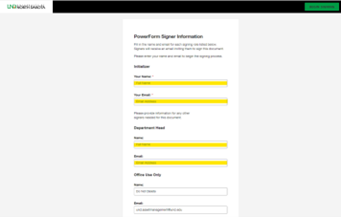
- Complete required fields in DocuSign and attach the PDF inventory listing.
-
- The required fields are Initializer Your Name, Initializer Your Email; Department Head Name; and Department Head Email
- Click “Begin Signing”
- Click the box to Agree to using electronic signatures and click “Continue”
- Complete the red highlighted areas – Department Number, Department Name, Title and Date Verified:
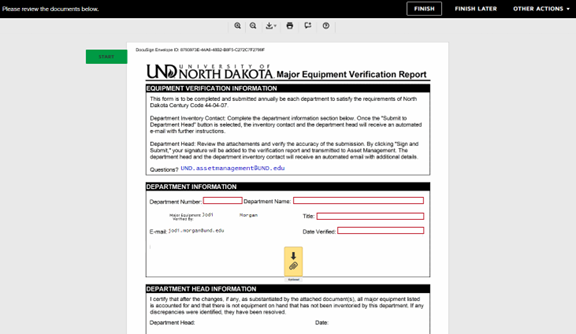
- After filling in the department information, you must click on the yellow box with the paperclip. You will upload and attach your inventory listing you saved earlier as a pdf file.
- After attaching your inventory listing, click the “Finish” button. This will send the docusign to the department head. Once they sign, the forms will automatically be sent to Asset Management.
- Please note the inventory submission is not complete until the department head signs and submits the Docusign file.
- Asset Management will review the submission and contact the department with any questions.
- Please separately email a copy of the spreadsheet saved as Excel file to Asset Management.
For more information, visit the Annual Major Equipment Inventory Website or email UND.assetmanagement@UND.edu.