University of North Dakota
    • Email
    • Employee Self-Service
    • Finance (PeopleSoft)
    • Campus Connection
    • Flex Spending
    • Hawk Central
    • Faculty Success
  • Calendar
  • Directory
  • Scope of this search:
Campus Services
  • Employee Resources
    • Job Openings
    • Benefits
    • Equal Opportunity
    • Staff Senate
    • Accessibility Resources (Accessible UND)
    • TTaDA (Professional Development)
    • UCLC (Childcare)
    • University Council for Women+
    • University Senate
    • Work Well (Employee Wellness)
  • Financial Services
    • Shared Service Center
    • Grants & Contracts Accounting
    • Procurement & Payment Services
    • Resource Planning & Allocation
    • Treasury
    • Accounting Services-Controller
    • Travel Planning & Resources
  • Operations
    • Facilities Management
    • Parking & Transportation
    • Policy Office
    • Records Management
    • Safety
  • Communication Services
    • Brand and Identity
    • Campus Postal Services
    • Duplicating
    • Marketing & Communications
    • Telecommunications
    • University Information Technology
    • Web Support
University of North Dakota
  • Employee Resources
    • Job Openings
    • Benefits
    • Equal Opportunity
    • Staff Senate
    • Accessibility Resources (Accessible UND)
    • TTaDA (Professional Development)
    • UCLC (Childcare)
    • University Council for Women+
    • University Senate
    • Work Well (Employee Wellness)
  • Financial Services
    • Shared Service Center
    • Grants & Contracts Accounting
    • Procurement & Payment Services
    • Resource Planning & Allocation
    • Treasury
    • Accounting Services-Controller
    • Travel Planning & Resources
  • Operations
    • Facilities Management
    • Parking & Transportation
    • Policy Office
    • Records Management
    • Safety
  • Communication Services
    • Brand and Identity
    • Campus Postal Services
    • Duplicating
    • Marketing & Communications
    • Telecommunications
    • University Information Technology
    • Web Support
Scope of this search:
  • Home
  • Finance
  • Procurement & Payment Services
  • Payment Services
Skip Section Navigation
  • Procurement & Payment Services
  • Faculty/Staff Resources Show/hide children
    • Procurement Decision Process
    • FAQs
    • Contractual Signature Policy
  • Travel
  • Fiscal Year End
  • Payment Services
  • P-Card
  • Vendors
  • Contact Us

Payment Services

The University of North Dakota's Payment Services department handles all supplier invoices, student refunds, employee reimbursements, and non-employee reimbursements. Payment Services also manages the University's P-Card and Travel and Expense programs.

P-Card

Travel & Expense

Supplier/Individual Set Up

Payment Services FAQs

Click on purchase order that is shown as an error in the email, in the middle of the top menu bar in gray text is "Receipts". Click "Receipts", next you will see a "+" click this, create a quantity or cost receipt. 

Click on the link to the PO in the email you received. Click on the "Invoices" tab. Review the "In Process" invoices by clicking on the blue hyperlinked "Invoice Number" that starts with a "V". Then review the "Matching" tab on the voucher/invoice. 

The orange highlighted text indicates the action that is required. 
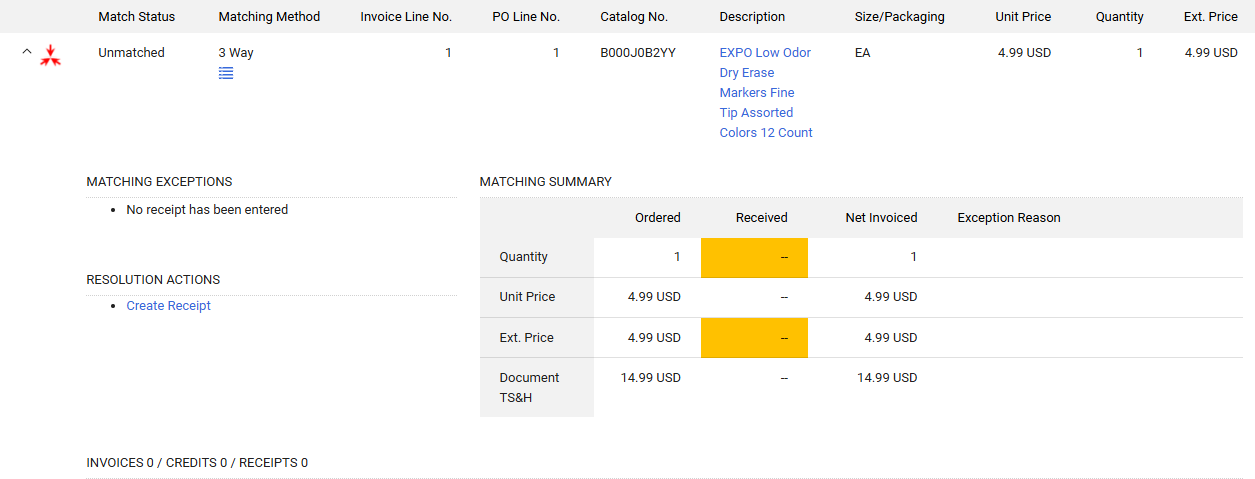
Screenshot of UND Marketplace

If you have received the items or services, please create a receipt for the cost or quantity indicated.

Unfortunately receipts can not be corrected. If you have over receipted and there is an invoice in the system that has paid, you can manually close the PO.  

If you have under receipted, please create an additional receipt for the difference. 

The receipt created does not determine the amount that is paid. The amount paid is what is indicated on the invoice.

If you have actually received the item, create a positive receipt against the item, then create a return receipt.  

Please create a receipt for the item received, next create a canceled receipt for the item canceled. 

No, you can create a receipt as soon as you have the item. 

A Journal Voucher is used to make a voucher correction.

Journal entries are used to correct a prior journal entry or to record a transaction in the general ledger that does not run through a PeopleSoft Finance module.

  • How to process a Journal Voucher (Video)
  • How process a journal voucher (guide)

Payment Services will monitor for the error and notify you when the error occurs. If you need assistance with setting up a budget or completing a budget journal please work with the finance contact in your department.

Reach out to the supplier who was incorrectly paid and request the check be sent back if it has not been cashed. When the check is received, the check will need to be sent to PPS to be canceled. Please include the UND Marketplace req, PO, and invoice and document the reason for cancellation. If the check was cashed, then the supplier should return the funds via check to the department. The department can then submit a departmental deposit. 

The department should process payment to the correct supplier, but will need to add an “A” (e.g. #1234-A) to the invoice number so that it will not error out as a duplicate payment.

Procurement & Payment Services
Bronson Center Room 120
1301 Ralph Engelstad Arena Dr Stop 8356
Grand Forks, ND 58202-8356
P 701.777.2771
F 701.777.3948
UND.pps@UND.edu

We use cookies on this site to enhance your user experience.

By clicking any link on this page you are giving your consent for us to set cookies, Privacy Information.

UND.info@UND.edu  |  701.777.3000
  • YouTube
  • Instagram
  • Facebook
  • LinkedIn
  • Campus Map
  • Employment
  • Vector Solutions Training
  • UND Today
  • U Letter
  • Campus Safety (SafeUND)
University of North Dakota

© 2025 University of North Dakota - Grand Forks, ND - Member of ND University System

  • Accessibility & Website Feedback
  • Terms of Use & Privacy
  • Notice of Nondiscrimination
  • Student Disclosure Information
  • Title IX
©